Marketing Builder
A Cowork skill that turns a sales rep's plain-English request ("spin up a sell sheet of our glove line for Ahold Delhaize") into a polished, co-branded, print-ready PDF in under a minute — with real catalog products pulled from the PIM and a vCard QR baked into the sales-rep footer.
Inside the app
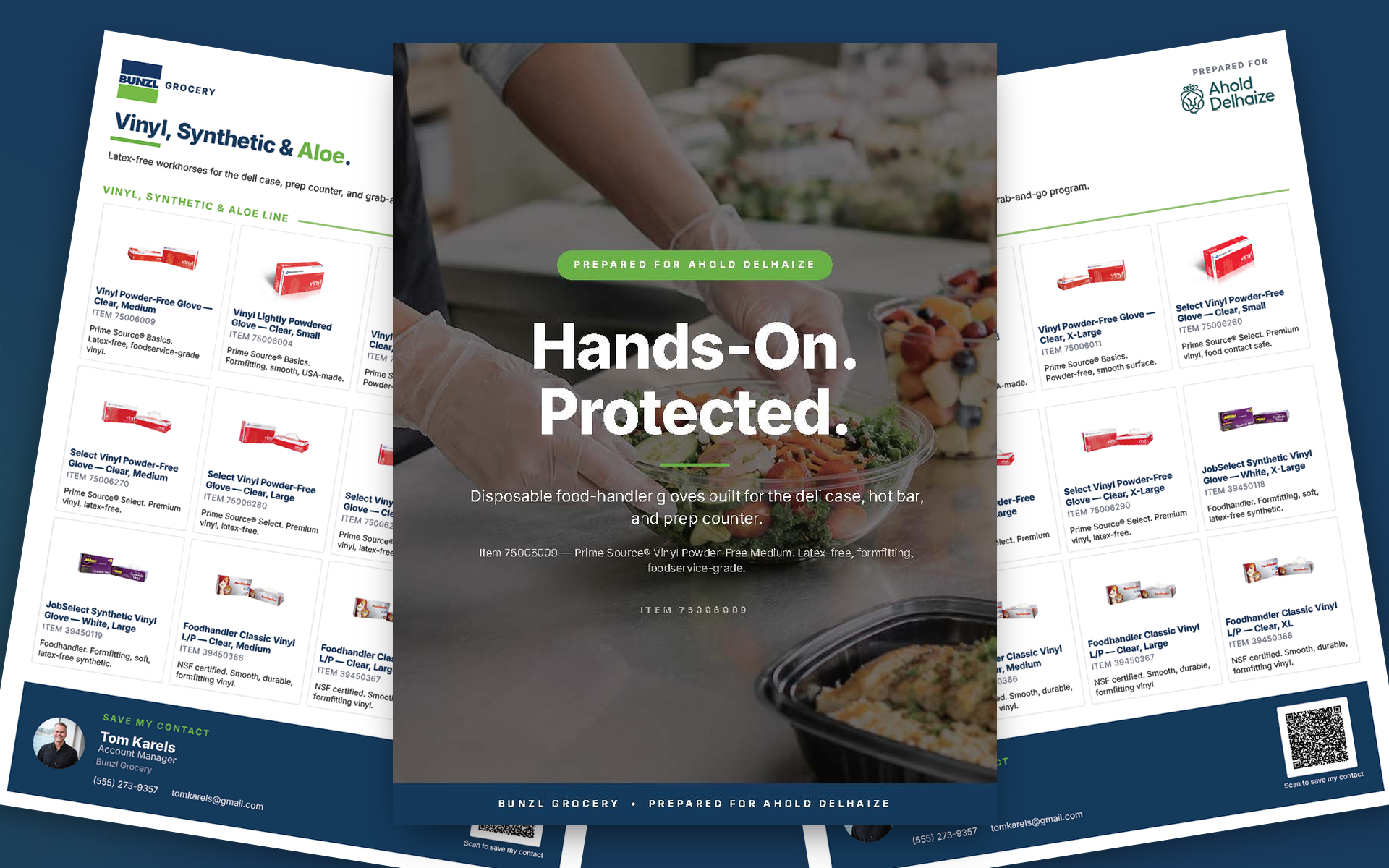
Marketing Builder is the `react-pdf-from-mockup` skill: a component-system skill that lets a sales rep, account manager, or category lead ask in plain English ("spin up a sell sheet of our glove line for Ahold Delhaize") and get back a polished, print-ready PDF in roughly a minute — co-branded to the destination account and personalized to the rep, with a scannable vCard QR built into the footer. Under the hood it's a small design system. A brand library (Bunzl, R3 Redistributors, generic) holds colors, voice, and footer treatment. A template library ships three starter spec shapes (`sell-sheet-full`, `sell-sheet-lean`, `line-card`). A block catalog (Hero, BulletColumn, NumberedCard, ValueStrip, TileGrid, FooterBand, plus a SalesRepFooter for personalization) composes the page. A category playbook adapts the block stack to any vertical with worked examples for Dairy, Bakery, Butcher, and Electronics. When Cowork invokes the skill, Claude reads the brand voice, picks a template, drafts copy in that voice, pulls real product imagery from the inriver PIM or generates supporting visuals through ChatGPT in Chrome, validates the spec against a JSON schema, and renders the PDF via `@react-pdf/renderer`. A visual composer with library/canvas/properties panes lets a non-technical teammate edit the spec in the browser with live preview. Key capabilities include: - Natural-language trigger from Cowork (no spec syntax) - Brand library with voice + palette + footer per brand - Co-brand support: `Prepared For` block stamps the destination account on the cover - Sales-rep personalization: SalesRepFooter with headshot + auto-generated vCard QR - Three starter templates (full, lean, line-card) plus a scaffolder - Nine block primitives, each with multiple variants - JSON-schema validation with precise per-block errors - inriver PIM integration for real product titles, images, and item numbers - ChatGPT-in-Chrome image generation with clipboard fallback - Visual composer with live PDF preview at localhost:5173
Sales Collateral Bottlenecked at the Designer
Across a national B2B distribution business, sales reps lose deals between calls because the marketing collateral they need can't keep up. The bottleneck isn't creativity — it's assembly.
Every Sell Sheet Is a Designer Round Trip: A rep asks marketing for a one-pager on a category — bakery films, dairy case stackers, butcher cut-resistant gloves. Marketing schedules the request, a designer opens InDesign, finds the brand palette, sources product imagery, writes the copy, runs brand review, exports a PDF. Two-week turnaround is normal. Reps walk into and out of customer calls without the materials they need.
Brand Drift at the Edges: When a rep tries to short-cut the queue and assemble a sheet themselves in PowerPoint, the result is off-brand: wrong palette, wrong voice, wrong logo lockup. Marketing has to either let it ship and erode the brand, or send it back to the queue, which defeats the point.
Imagery Is the Slow Step: Even when copy is ready, finding or generating product photography that matches the category and looks like a coordinated set kills the timeline. AI image generation helps, but only if the rep knows how to prompt it, and only if the output can be brought back into the layout without manual cleanup.
Tooling Lives in the Designer's Brain: There's no shared definition of what a "Bunzl Bakery sell sheet" looks like. The component vocabulary (hero, why-it-matters bullets, value strip, essentials grid, branded footer) lives in years of muscle memory, not in any system a non-designer can pick up.
Process
Brand + Template Resolution
Cowork reads the rep's plain-English request ("build me a sell sheet for the bakery department") and resolves three things: the brand (Bunzl Grocery), the division (Bakery), and the layout pattern (`sell-sheet-lean` for image-light, breathing pages; `sell-sheet-full` for richer content with 9 image slots; `line-card` for a 12-tile catalog page). The brand library holds the palette, logo lockup, voice rules, and footer treatment per brand.
Block Stack + Copy in the Brand's Voice
The scaffolder writes a starter spec into the working folder. Claude drafts copy block by block in the resolved brand's voice — outcome-led headlines with the last word colored accent green, ≤14-word benefit lines, all-caps verb-led bullet labels (SAVE LABOR, REDUCE SHRINK, PROTECT QUALITY). A category playbook adapts the block stack to any vertical with worked examples for Dairy, Bakery, Butcher, and Electronics so unfamiliar categories still get the right pattern.
Co-Brand + Sales-Rep Personalization
Every sheet is co-brandable to the account it's being prepared for — the Ahold Delhaize cover renders a `Prepared For` lockup and an account-specific colorway from a single field in the spec. The footer band is rep-personalized: the SalesRepFooter component takes a name, title, headshot, phone, email, and auto-generates a vCard QR code, so a prospect can save the rep's contact in one scan straight off the printed page.
Validate, Render, Hand Back
Every image slot in the spec gets a prompt drafted in the brand's visual idiom; the skill drives ChatGPT in Chrome to generate the assets, with a clipboard relay fallback. For real SKUs, an inriver PIM helper pulls actual product title, image, and item number — the Vinyl line card above is twelve real Bunzl-catalog products composed automatically from item IDs in the spec. The finished spec is validated against `schema/spec.schema.json` (per-block error messages so the LLM can self-correct), rendered through `@react-pdf/renderer`, and handed back through `present_files`.
A Component System That Speaks Sales-Rep
Marketing Builder is a small, opinionated design system wrapped in a Cowork skill — three layers (tokens, theme, components) on top of @react-pdf/renderer, with a brand library and a category playbook that let one rep ask for one sheet in one sentence.
Three Layers: Tokens (tokens.mjs) hold the spacing scale, type scale, radii, and slot sizes. Theme (theme.mjs) holds colors and fonts, brand-overridable per spec. Components (components/*.mjs) are nine block primitives — BrandHeader, Hero, BulletColumn, NumberedCard, ValueStrip, TileGrid, FooterBand, Row, Spacer — each with multiple variants. The complete browsable catalog lives at catalog/catalog.html.
JSON Spec, Schema-Validated: A sell sheet is an ordered array of typed blocks plus a theme and a page setup. Every spec is validated against schema/spec.schema.json before rendering; errors are reported per-block so the LLM (or a human) can fix exactly the right field.
Brand Library: brands/bunzl.json, brands/r3-redistributors.json, and brands/generic.json ship out of the box. Each brand file declares the palette, the logo lockup, the footer treatment, and the voice — headline cadence, body line discipline, bullet label conventions, footer slogan rhythm.
Co-Brand + Sales-Rep Personalization: A Prepared For block stamps the destination account on the cover (the gallery shows a Bunzl × Ahold Delhaize sample), and the SalesRepFooter component takes a rep's name, title, headshot, phone, and email, then auto-generates a vCard QR code so a buyer can save the rep's contact in one scan straight off the printed page.
Category Playbook: references/category-playbook.md is a META guide for any category or industry. A six-step process — frame audience, pick GTM angle, decompose into bullets, pick hero features, pick essentials tiles, image direction — adapts the block stack to verticals the skill has never seen before, with worked examples for Dairy, Bakery, Butcher, and Electronics to learn from.
Visual Composer: For teammates who don't want to write JSON, composer/composer.html is a browser-based composer with library, canvas, and properties panes. A companion preview server on localhost:5173 POSTs the current spec to /render and shows page 1 inline.
Loading diagram...
Real Catalog, Real Products: When a rep names specific SKUs, an inriver PIM helper fetches product title, hero image, and customer item number straight from the source-of-truth PIM. The Vinyl line card in the gallery is twelve real Bunzl Prime Source®, JobSelect, and Foodhandler items composed automatically from item IDs in the spec.
One Component System, Any Vertical: The Bunzl-led patterns work the same way for any category. The skill ships worked examples for Dairy, Bakery, Butcher, and Electronics, and the same component system stretches to industrial, retail, or pet without changing a line of renderer code.